🎭 Multi-Face Swap Revolution - Swap Multiple Faces Simultaneously!
The game-changing update you've been waiting for! Now swap up to 6 faces in real-time with zero lag. Perfect for group streams, video calls, and content creation.
Deep Live Cam AI
Professional Real-time Face Swap AI Software
50K+
Active Users
99%
Accuracy Rate
Real-time
Processing
Free
Open Source
Deep Live Cam is the most advanced real-time face swap software for Windows PC. Perfect for streamers, content creators, and video professionals. Swap faces seamlessly during live streaming, video calls, or recorded videos with AI-powered precision. Download the FREE version with full features today!







📹 Complete Installation Guides
Watch our comprehensive step-by-step tutorials to install and configure Deep Live Cam perfectly for your chosen edition.
System Setup
Complete installation process
Configuration
Optimize settings for best results
Troubleshooting
Fix common issues quickly
⚠️ Ethical Use Notice: Use responsibly with consent. Never use for malicious purposes, fraud, or deception. Always comply with local laws and platform terms of service. This software is for entertainment and creative purposes only.
Professional AI Features

1-Click Swap
No complex setup. Powered by cutting-edge deep learning algorithms. Choose a face model and start swapping instantly.

GPU Accelerated
No lag, no delay. Process up to 60 FPS for seamless real-time performance with optimized GPU acceleration.

Universal Support
Swap faces from your webcam during streaming or video calls on Zoom, Teams, Skype, or Discord. Supports pre-recorded video files.
System Requirements
- Minimum: Mid-range PC, 8GB RAM, DirectX 12.
- Optimal: NVIDIA GPU (4GB+ VRAM), 16GB RAM for 60 FPS.
- OS: Windows 10/11 (64-bit).
Get Started in 3 Easy Steps
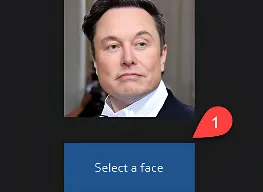
Select Face Model
Upload a clear photo (or many for training) of the face you want to use.
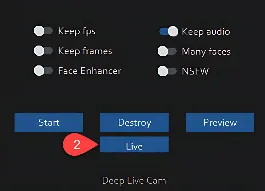
Configure Settings
Adjust blend, lighting, and GPU settings to achieve natural results.

Go Live!
Select "Deep Live Cam AI" as your camera in OBS, Zoom, or Discord.
Trusted by Top Creators
Join thousands of streamers and content creators who use Deep Live Cam AI daily.
Frequently Asked Questions
Is Deep Live Cam AI free?
Yes, Deep Live Cam AI is completely free and open-source. There are no hidden fees or subscriptions. We believe in making AI technology accessible to everyone.
Which platforms does it support?
Deep Live Cam AI creates a virtual webcam that works with any software: Zoom, Skype, Teams, Discord, OBS, Streamlabs, etc.
Can I train my own face models?
Yes! You need 100-500 clear photos of the target face. Use our included training tools or check our GitHub for guides.
Is it detectable?
Our AI produces high-quality results, but advanced forensic tools may identify AI-generated content. Always use responsibly.
UNLEASH THE AI: 1-CLICK TO SWAP
Select the edition that best fits your workflow. 100% Automated. Instant Execution.
LITE WEB INSTALLER
Ultra-Lightweight Setup (1GB)
Our smart installer automatically provisions the Python environment and fetches the latest AI models in the background upon first launch.
(Estimated setup time: 5-10 minutes depending on network speed)
⬇ Download Lite Edition (1GB)FULL BUNDLE EDITION
Ultimate Offline Archive (4.3GB)
Pre-packed with a dedicated Portable Python engine, CUDA libraries, and all core AI Models. Extract the archive and it's ready to blast off instantly!
⚡ Download Full Version (4.3GB)